

Verada AI Tags
Introduction
AI Tags uses Verada AI to automatically generate relevant, customer-friendly keywords for every product in your catalog. These tags appear on your product pages and power an intuitive discovery experience that helps shoppers find products they'll love — even ones they weren't looking for.
No manual tagging. No guesswork. Just smarter product discovery that increases engagement and sales.
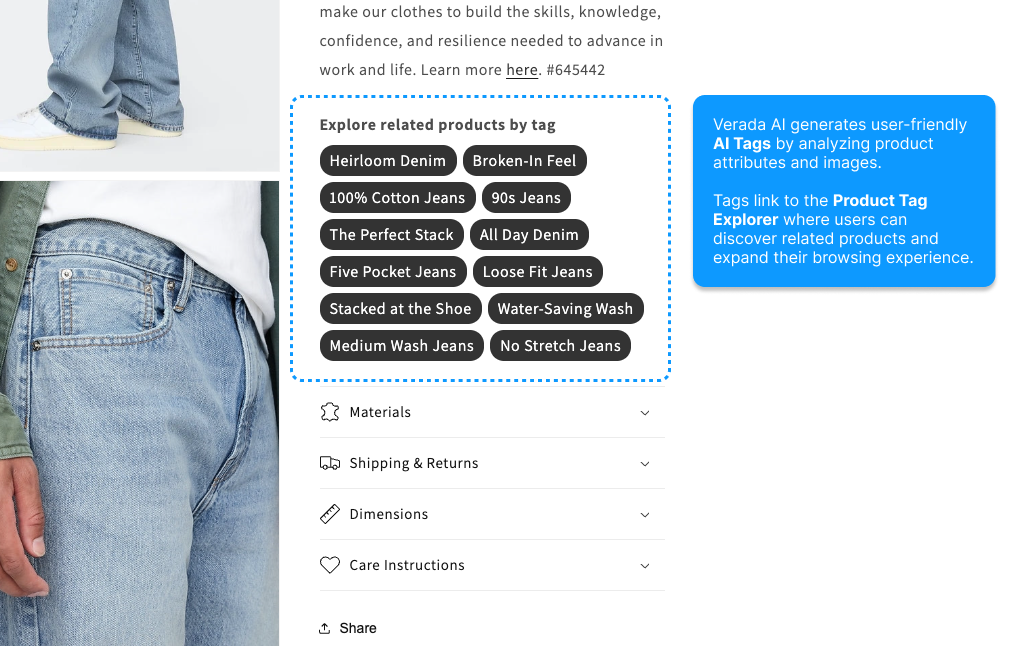 An example of AI Tags embedded on a product page.
What Are AI Tags?
Beyond Categories and Filters
Traditional ecommerce navigation relies on rigid categories (Furniture > Living Room > Chairs) and technical facets (Price, Color, Size). Product Tags work differently — they describe products the way real customers think and shop.
Instead of navigating by structure, customers browser by:
- Style and aesthetic — "Minimalist", "Boho Chic", "Industrial"
- Occasion and use — "Date Night", "Work From Home", "Gift-Worthy"
- Feeling and mood — "Cozy Vibes", "Statement Piece", "Everyday Essential"
- Features that matter — "Handmade", "Beginner-Friendly", "Easy Care"
Tags create natural pathways through your catalog, letting customers explore by what resonates with them.
The Shopping Experience
Imagine a customer browsing a ceramic vase. They see tags like "Artisan Crafted", "Earth Tones" and "Minimalist". They click "Earth Tones" — suddenly they're exploring throw pillows, wall art, and candles that share that aesthetic. They discover products across multiple categories they never would have found through traditional search or navigation.
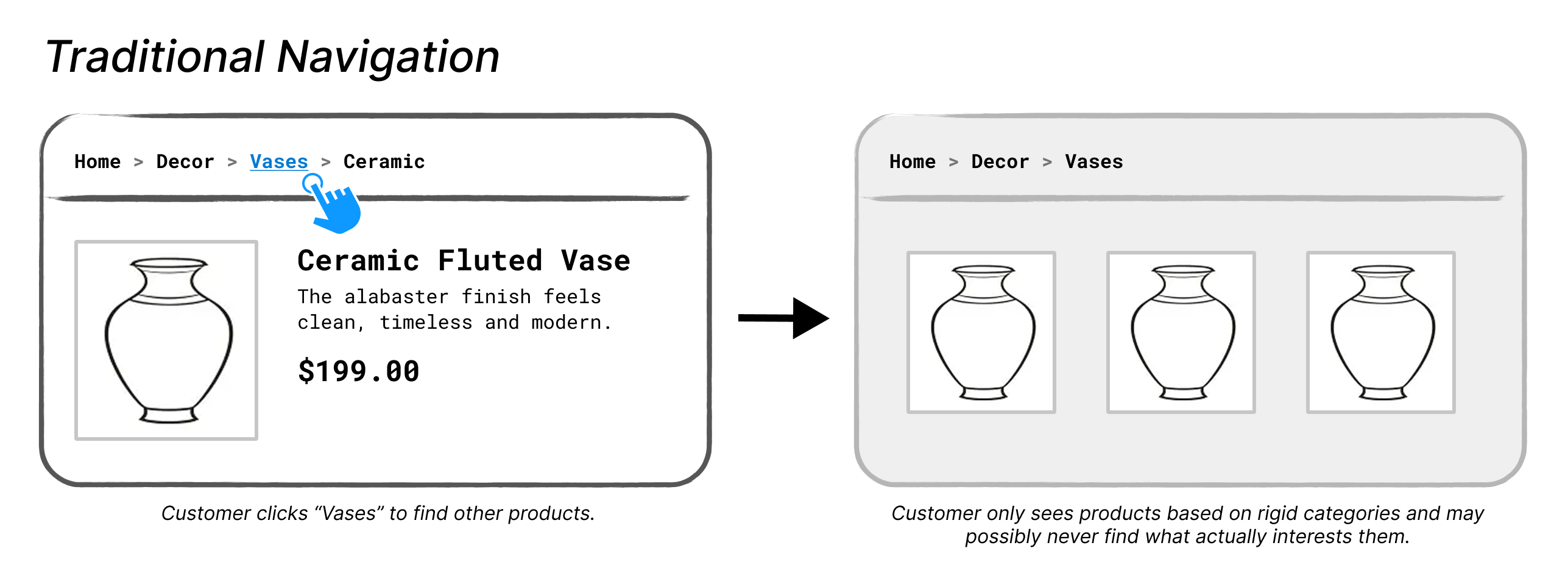 Traditional navigation flow.
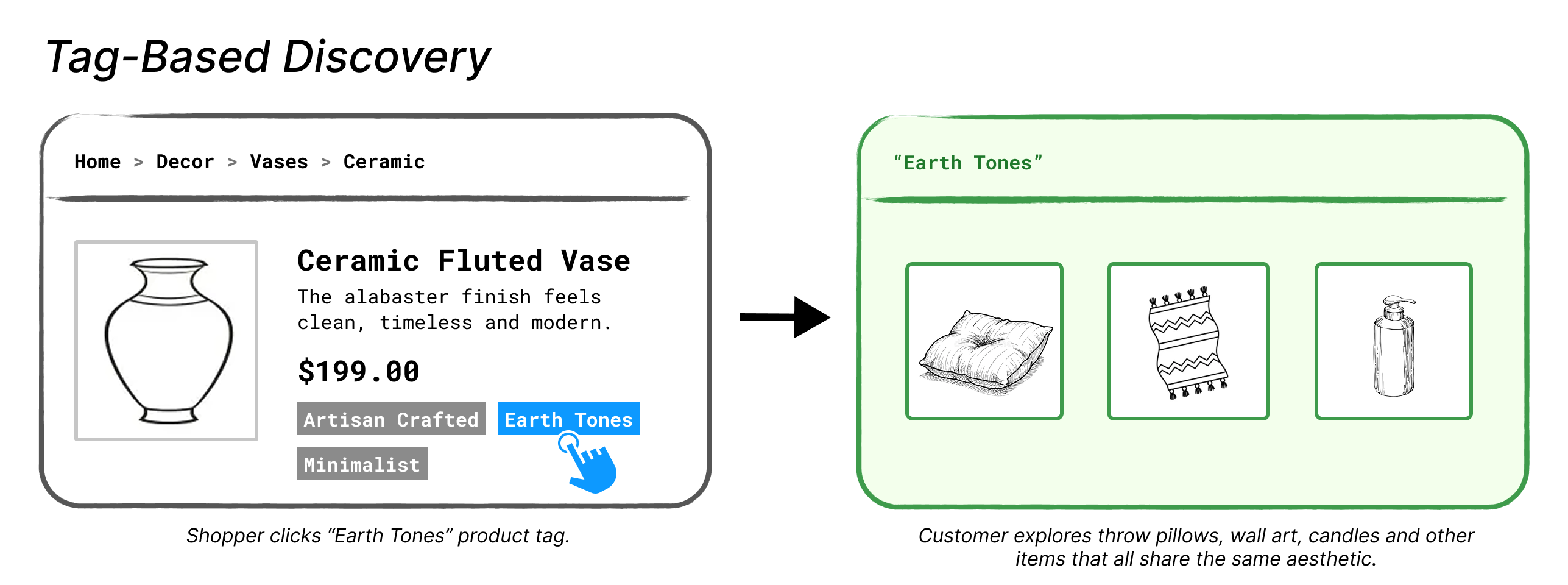 Tag-based discovery flow.
Tag-powered browsing can lead to improved product discovery and help customers find more products they love, even ones they weren't initially searching for. This can increase cart sizes and revenue.
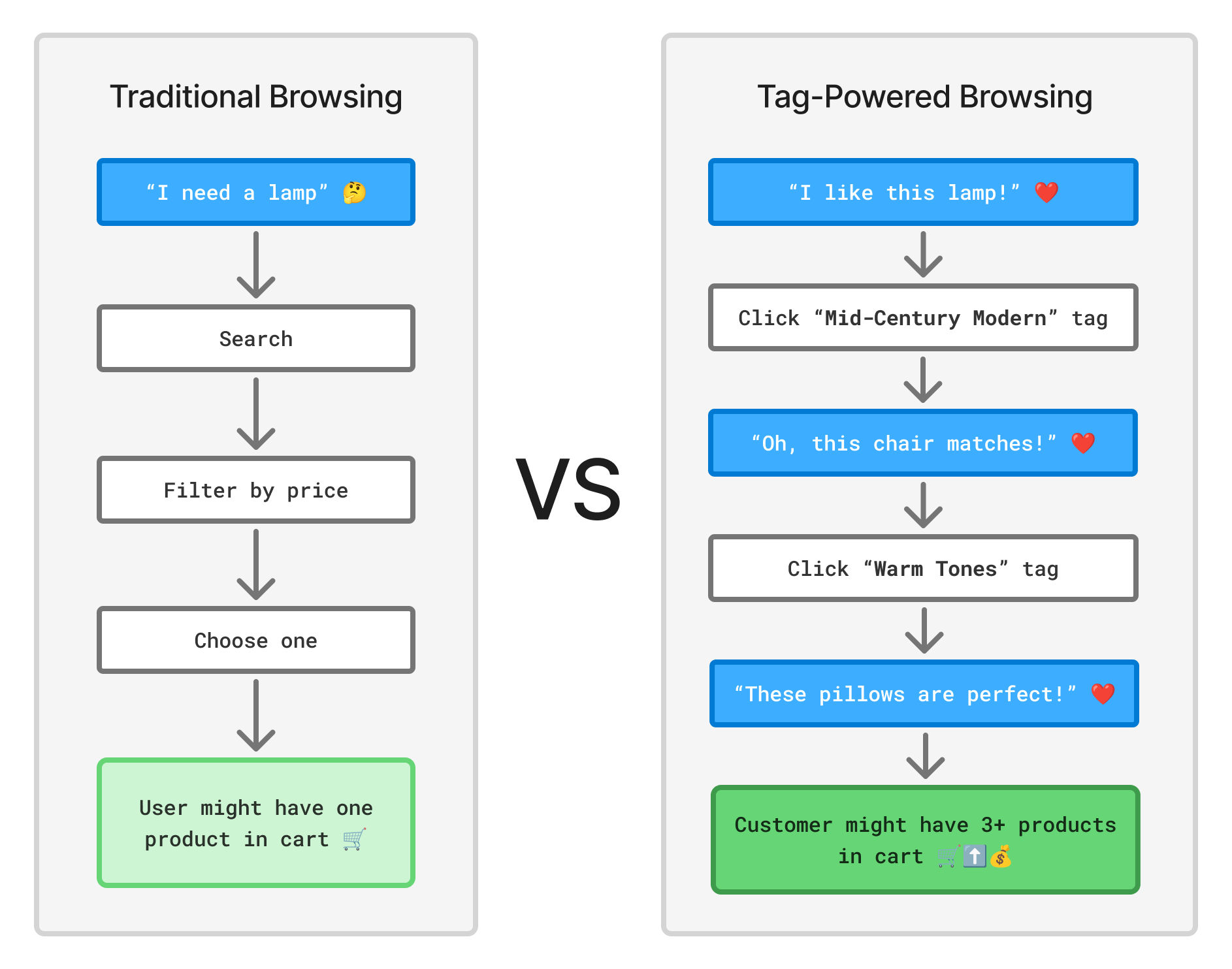 Tag-based browsing adds opportunities for increased product exploration and cart sizes.
Where can AI tags be used?
We suggest AI tags are generally for use on product pages.
That said there are more places they can be used:
Product pages: A product ID is available, and tags related to that product will be shown.
Category pages: If no product ID is available, but a category ID is present we will show tags related to all products in that category.
Other pages: If neither a product ID nor a category ID is present in tracking, "top tags" for the site will be used.
WARNING
Product IDs and Category IDs tracked must match those in your Catalog.
How It Works
Intelligent Tag Generation
Verada AI analyzes multiple aspects of your catalog to understand what makes each product unique:
- Product information — Titles, descriptions, attributes you've already defined.
- Visual analysis — AI examines product images to identify style, color palette, patterns and context.
- Contextual understanding — The system learns from your entire catalog to generate tags that are consistent and relevant across all products.
- Natural language — Tags are written in friendly, conversational language that matches how customers actually search and shop.
Always Up to Date
Once enabled, AI Tags continuously works in the background:
- New products are automatically tagged as they appear in your catalog.
- Existing tags are refined as your catalog grows and the AI learns.
- Seasonal and trending tags emerge naturally based on product attributes.
- No maintenance required.
 Tag generation steps.
User Experience
AI Tags uses two complementary widgets that work together to create a seamless discovery experience.
Product Tag List Widget
- Where it lives: — Typically embedded directly on individual product pages below the product description or near the "Add to Cart" button. Can also be embedded in on non product pages.
- What it displays: — A curated collection of 5 or more relevant tags specific to that product (e.g. "Vintage Style", "Handmade", "Gift-Worthy", "Eco-Friendly"). When used on non product pages, the tags will instead consist of the most popular tags on your catalog by clicks.
- What customers do: — Click any tag that interests them to explore similar products.
- Your control: Choose positioning, styling, and how many tags to display.
An example of a Product Tag List widget embedded on a product page.
Product Tag Explorer Widget
- Where it lives: — On dedicated collection pages (e.g.,
yourstore.com/explore?tag=minimalist-design) - What it displays: — A full browsable grid of all products that share the selected tag, with options to explore other related tags.
- What customers do: — Browse the collection, explore related tags, and click products to view details.
- Your control: Customize the layout, number of products per row, filtering options, and overall design.
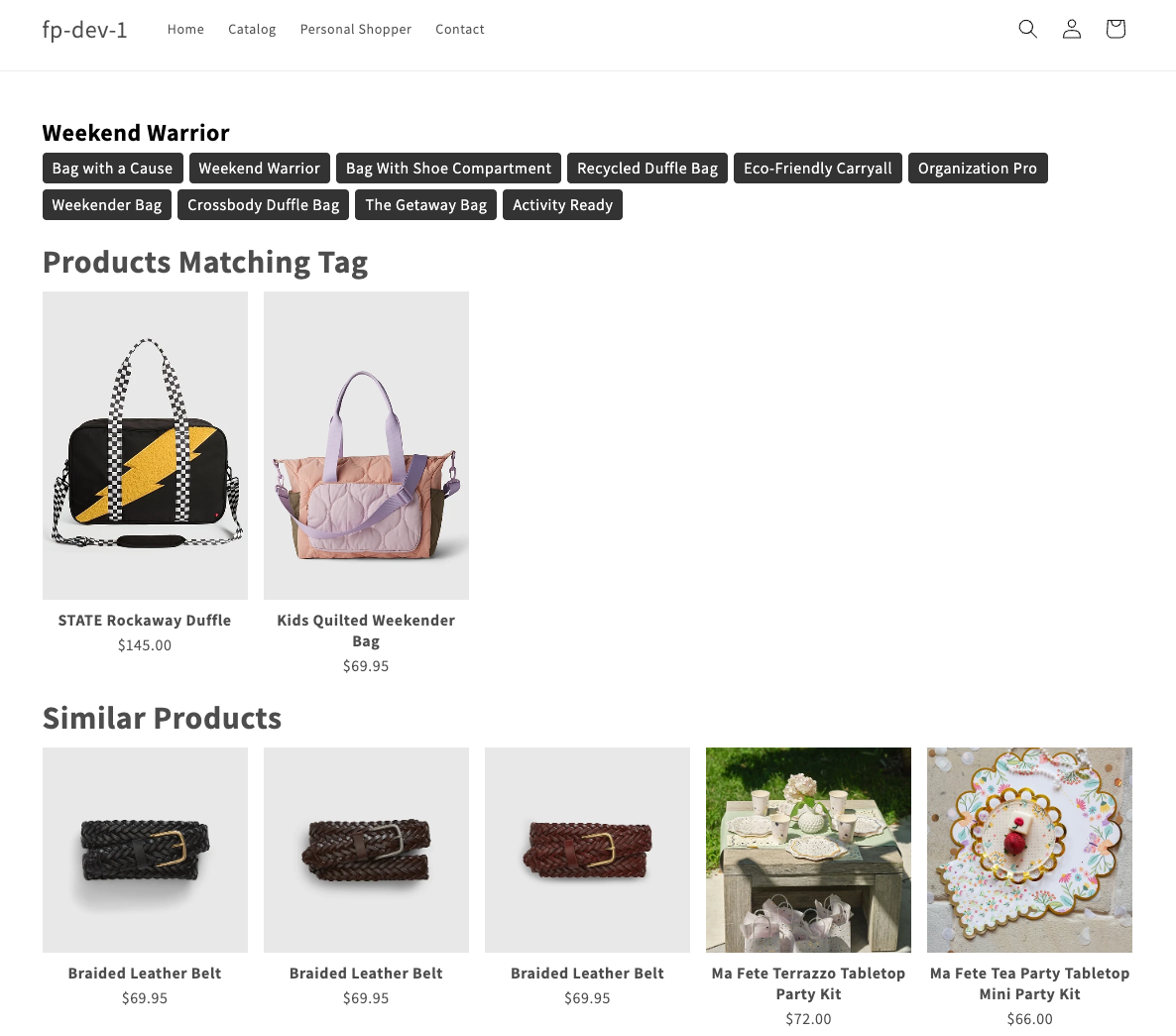 An example of the Product Tag Explorer widget embedded on a dedicated page.
How They Work Together
The magic happens when both widgets create a continuous journey of exploration:
- Step 1: Customer lands on a product page (maybe from search or social media) → Tag List Widget shows related tags
- Step 2: Customer clicks a tag that resonates with them (e.g., "Scandinavian Design") → Taken to a collection page powered by Tag Explorer Widget
- Step 3: Customer browses the curated collection and clicks another product that catches their eye → Back to a product page with Tag List Widget showing new, related tags
- Step 4: Customer discovers a new tag (e.g., "Natural Materials") and clicks it → The loop continues, keeping them engaged and discovering
Creating a Widget
The Product Tag Explorer widget must be created in the Merchandising Widget editor. As for the Product Tag List widget, this can be created in either the Merchandising Widget editor or the Creative Editor. Use the tips below to decide which editor to use for the Product Tag List widget:
- Merchandising Widget Editor - Use when you want the most flexibility in terms of design and least complexity in terms of when to show to your users
- Creative Editor - Use when you need to leverage Fanplayr's segmentation engine to only target specific users with your widget or if you want to show widget as a flyout. See more details here.
No matter where the widget is created, it should still link your users to a Product Tag Explorer created in the Merchandising Widget editor.
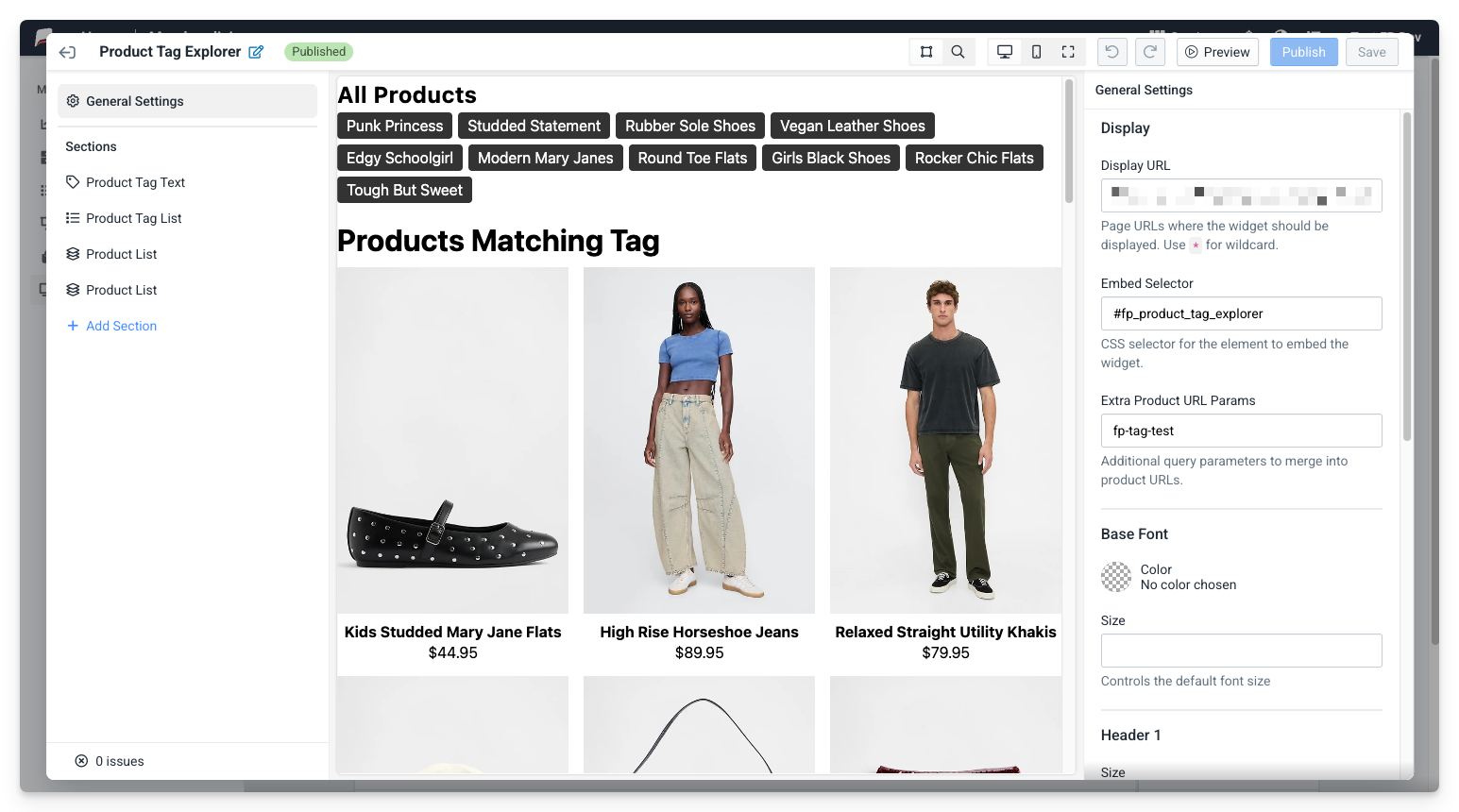 Merchandising Widget Editor
Managing Tags
Verada AI generates relevant tags for each of your products. However, if you want an additional level of management and customization, Fanplayr gives you the ability to fine-tune the tags to your preference.
- Rename generated tags
- Create your own tags
- Link or unlink products to specific tags
See the Managing Tags documentation for more information.
Key Benefits
For your business
- Boost discovery: Customers find products they wouldn't have searched for.
- Increase basket size: Tag browsing encourages exploration across categories.
- Save time: No manually tagging required - Fanplayr AI does the work.
- Stay consistent: Tags use natural, shopper-friendly language.
For your customers
- Better browsing: Explore by style, mood, or feature instead of rigid categories.
- Enhanced discovery: Find unexpected items that match their taste.
- Faster shopping: Jump directly to relevant products.